
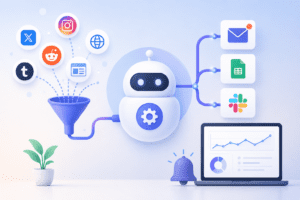
If you’ve ever Googled your own company name at midnight wondering what people are saying about you, you already know the problem. Manually checking for brand mentions is exhausting, inconsistent, and honestly — a waste of your time. The good news? You can build a true automation to track brand mentions in a single afternoon, and once it’s live, it runs forever without you lifting a finger.
In this guide, we’ll walk through exactly how to set up a reliable, low-maintenance automation to track brand mentions across the web, social media, news sites, forums, and review platforms — using a mix of free and paid tools, no coding required.
Why You Need an Automation to Track Brand Mentions
Every day, people talk about your brand — in tweets, blog comments, Reddit threads, news articles, and customer reviews. Without an automation to track brand mentions, you’re flying blind. You might miss a viral complaint, a glowing testimonial worth sharing, or a competitor comparison that could use a friendly nudge in your direction.
| Benefit | Why It Matters |
|---|---|
| ⚡ Real-time alerts | Respond to issues before they escalate |
| 📈 Reputation insight | Spot sentiment trends over time |
| 🤝 Engagement opportunities | Reply to happy customers and amplify praise |
| 🕵️ Competitive intelligence | See how you stack up in conversations |
| 🛌 Zero manual effort | Once built, the automation runs itself |
Tools You’ll Need to Build This Automation
Before building your automation to track brand mentions, gather these three categories of tools:
- Listening Source: Google Alerts (free), Mention, Brand24, or Talkwalker
- Automation Engine: Zapier, Make (formerly Integromat), or n8n
- Destination: Slack channel, email inbox, Google Sheet, or Notion database
Step-by-Step: Building Your Hands-Off Automation
Step 1: Set Up Your Listening Source
Start with Google Alerts if you’re on a budget — it’s free and surprisingly capable for a basic automation to track brand mentions. Go to Google Alerts, type in your brand name (use quotation marks for exact match), and set delivery to “as-it-happens.” Create 3–4 alert variations: your brand name, product names, founder name, and common misspellings.
For deeper coverage including social media and forums, use a dedicated tool like Brand24 or Mention. These platforms monitor Twitter/X, Reddit, Instagram, YouTube comments, and news sites in real time — something Google Alerts can’t fully do.
Step 2: Connect Your Automation Engine
This is the heart of your automation to track brand mentions. Zapier and Make both offer RSS and email triggers that work perfectly with Google Alerts (which delivers via RSS feed or email). For Brand24 or Mention, use their native Zapier integrations.
Step 3: Route Mentions to the Right Place
Decide where your team should see new mentions. Most teams pick one of these three destinations:
| Destination | Best For |
|---|---|
| Slack Channel | Fast-moving teams who want instant visibility |
| Google Sheet | Tracking history and running sentiment reports |
| Email Digest | Small teams who prefer a daily summary |
In Zapier, this means creating a Zap: Trigger = “New RSS Item” or “New Mention” → Action = “Send Channel Message in Slack” or “Create Spreadsheet Row.” This single workflow is the backbone of your automation to track brand mentions.
Step 4: Add a Sentiment Filter (Optional but Powerful)
Want your automation to track brand mentions to be even smarter? Add a filter step using a simple AI action (OpenAI or Claude integration inside Zapier/Make) that tags each mention as Positive, Negative, or Neutral before it lands in Slack. This way your team can prioritize urgent negative mentions instantly.
Step 5: Test and Let It Run
Trigger a test mention (post something with your brand name on a public forum or ask a friend to tweet it) and confirm it flows through the entire pipeline. Once confirmed, your automation to track brand mentions is officially hands-off — no further maintenance needed beyond an occasional keyword review.
Comparison: Free vs Paid Brand Monitoring Stacks
| Stack | Cost | Coverage | Setup Time |
|---|---|---|---|
| Google Alerts + Zapier | Free–$20/mo | Web & news only | 15 minutes |
| Brand24 + Zapier | ~$79/mo | Web, social, forums | 30 minutes |
| Mention + Make + Slack | ~$89/mo | Web, social, reviews | 45 minutes |
Common Mistakes to Avoid
- Using only your exact brand name — add common misspellings and product names
- Forgetting to filter spam or low-quality sites that trigger false positives
- Routing everything to email, which gets ignored — Slack has better visibility
- Not reviewing the keyword list quarterly as your brand evolves
Frequently Asked Questions
What is the easiest way to start an automation to track brand mentions?
The easiest starting point is Google Alerts combined with a free Zapier plan. It takes about 15 minutes and covers basic web and news mentions at zero cost.
Can I track brand mentions on social media for free?
Partially. Google Alerts misses most social platforms. For full social coverage, a paid tool like Brand24 or Mention is necessary, though both offer free trials to test before committing.
How often does this automation check for new mentions?
Most tools check every few minutes to every hour, depending on the plan. Real-time alerts are available on most paid listening tools, while Google Alerts updates as-it-happens or in daily digests.
Does this automation work for multiple brands or products?
Yes. Simply duplicate the workflow for each brand or product name and route them into separate Slack channels or sheet tabs for clean organization.
Final Thoughts
Building a reliable automation to track brand mentions isn’t a luxury anymore — it’s table stakes for any brand that wants to protect its reputation and catch opportunities in real time. With the simple stack outlined above, you can have a fully hands-off system running before the end of the day, freeing you up to focus on what actually matters: responding, engaging, and growing.

Pingback: The Minimum Viable AI Stack for Local Service Businesses
Pingback: Connect Notion and Google Calendar via Automation for Absolute Focus